Replace Zapier with Custom Integration: When It's Worth It
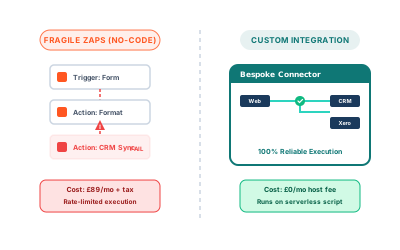
Zapier is a brilliant tool for getting something working quickly. You connect two apps, set up a trigger, and within an hour you've automated something that used to take fifteen minutes of manual effort every day. For a lot of businesses, that's exactly what they need.
But there's a pattern that comes up repeatedly: a business starts with one Zap, then five, then twenty. The monthly bill climbs past £200, then £400. Some automations run every few minutes and eat through task limits. Others break silently when an API changes. The person who built the original Zaps has left, and nobody fully understands what's running or why.
At that point, it's worth asking whether Zapier is still the right tool, or whether a custom integration would serve you better.
What Zapier actually charges you for
Zapier's pricing is based on tasks. Each time an automation runs and does something, that's a task. A simple two-step Zap that fires 500 times a month uses 500 tasks. A five-step Zap that fires 500 times uses 2,500.
If you're running high-volume automations (syncing CRM data every hour, processing form submissions, updating inventory), the numbers add up fast. The Professional plan starts around £49/month for 2,000 tasks. At 50,000 tasks, you're looking at £299/month or more.
That's not a criticism of Zapier; it's a fair price for the convenience it offers. But "convenience" has diminishing returns once you're spending serious money on it every month.
Signs you've outgrown no-code automation
Your monthly bill is over £150. This is roughly the threshold where a custom integration often pays for itself within a year. The development cost for a straightforward API integration is typically a few days of work, and after that the running cost is close to zero.
Automations break and nobody notices. Zapier doesn't always surface errors prominently. If a Zap fails because an API changed a field name, it might silently stop working for days. Custom integrations can be built with proper logging and alerting from the start.
You're working around Zapier's limitations. Adding extra steps just to transform data into the right format, using workarounds because a native integration doesn't support the field you need, or running automations in sequence because Zapier can't do what you actually want: these are signs the tool is constraining your workflow rather than enabling it.
You need real-time, not polling. Most Zapier triggers check for new data every 5 to 15 minutes depending on your plan. If your business process needs to react in seconds (a customer completes a payment and should immediately receive an access link), polling introduces delays that matter.
Your data is sensitive. When automations handle personal data, payment information, or business-critical records, routing everything through a third-party platform adds complexity to your data compliance picture. A custom integration keeps data flowing directly between your systems.
What a custom integration actually looks like
A custom integration is code that runs on your own infrastructure (or a serverless function) and connects two or more systems directly via their APIs.
Here's a simple example: instead of using Zapier to watch for new rows in a Google Sheet and create contacts in your CRM, you'd write a small script that the sheet triggers via a webhook:
// Webhook endpoint: receives data from Google Sheet via Apps Script
app.post('/webhook/new-contact', async (req, res) => {
  const { name, email, company } = req.body;

  await crmClient.contacts.create({
    name,
    email,
    company,
    source: 'google-sheet-import',
    created_at: new Date().toISOString(),
  });

  res.status(200).json({ ok: true });
});
This runs instantly (no polling delay), costs nothing per execution beyond your hosting, and you have full control over error handling, retries, and logging.
For more complex scenarios (syncing data bidirectionally between two systems, transforming data structures, handling rate limits gracefully), the code gets more involved, but the principle is the same: direct API calls, under your control, with none of the per-task cost.
When Zapier is still the right choice
Custom integrations aren't always better. There are situations where Zapier (or a similar tool) is genuinely the right answer:
- You need something working this week and the automation is low-volume
- The systems you're connecting have good Zapier support and the native integration does exactly what you need
- You don't have technical resource to maintain custom code
- The automation is temporary: a one-off data migration or a short campaign
No-code tools are genuinely useful. The question isn't "is Zapier bad?" It's "is Zapier still the right fit for where my business is now?"
The calculation worth making
Before deciding, do the maths. Take your current monthly Zapier cost and multiply by 12. That's your annual spend. A custom integration for a straightforward workflow typically costs £800 to £2,500 to build, depending on complexity. If your annual Zapier cost exceeds that, you break even in year one and save money every year after.
Beyond cost, factor in reliability, speed, and the time your team spends managing broken Zaps. These are harder to quantify but often worth more than the subscription savings.
Making the switch
If you decide to move to custom integrations, the process is usually:
- Audit your existing automations and identify which ones are high-volume or business-critical
- Prioritise the ones where Zapier is causing friction or cost
- Build replacements one at a time, running them in parallel with Zapier briefly to confirm they work
- Decommission the Zap once the custom version is proven
You don't need to rebuild everything at once. Most businesses find that 20% of their automations drive 80% of their Zapier costs, and fixing those few is often enough to justify the switch.
At Etminan AI Solutions, I help small businesses figure out exactly this kind of question: whether the tools you're using are still serving you, or whether it's time to build something that fits better. If your automation costs are climbing and your workflows feel like they're working around your tools rather than through them, get in touch. I'm happy to look at what you're running and give you an honest assessment.